
jQuery vs jQuery Slim: Everything You Need to Know Before Choosing the Wrong Version
4 minggu ago · Updated 4 minggu ago
In 2006, when John Resig introduced jQuery at BarCamp NYC, the JavaScript landscape was a source of significant frustration for web developers. The primary challenge was not a lack of capability in JavaScript itself, but the wildly inconsistent implementations of the language across different browsers. Writing JavaScript that worked correctly in Internet Explorer, Firefox, Safari, and Opera required extensive conditional logic, browser detection, and repetitive workarounds that cluttered code and consumed development time.
jQuery's core proposition was simple and immediately compelling: write JavaScript once, have it work everywhere. Beneath the clean, consistent API that jQuery exposed to developers, a sophisticated compatibility layer handled all the browser-specific differences invisibly. A developer calling jQuery's hide() method did not need to worry about whether the current browser expected element.style.display to be set to 'none' or handled it differently — jQuery just made it work, everywhere.
The second major contribution jQuery made to web development was its CSS-selector-based DOM traversal. Instead of writing verbose document.getElementById() or document.getElementsByTagName() calls, developers could write $("#myElement") or $(".myClass") using the same selector syntax they already knew from CSS. This syntactic elegance reduced the cognitive overhead of JavaScript development and opened the DOM to developers who were primarily designers and CSS specialists rather than trained programmers.
The third pillar of jQuery's success was its effects and animation system. Before jQuery, creating smooth JavaScript animations required writing timing loops, managing frame rates, and handling browser inconsistencies in animation support. jQuery's effects module wrapped all of this complexity in simple method calls: fadeIn(), fadeOut(), slideUp(), slideDown(), animate(). Suddenly, any web designer could add professional-quality animations to their work without a computer science degree.

jQuery in the Modern Web: Still Relevant in 2024?
The question of jQuery's relevance in the modern web development landscape is one that the developer community has debated with increasing intensity since the emergence of modern JavaScript frameworks like React, Angular, and Vue.js. The case against jQuery is well-rehearsed: modern browsers have standardized their JavaScript implementations, largely eliminating the cross-browser compatibility problems that were jQuery's original raison d'être. Native JavaScript now supports document.querySelector() (equivalent to jQuery's $ selector), Fetch API (equivalent to jQuery's AJAX module), and CSS transitions (which handle many use cases previously served by jQuery's effects module).
Despite these developments, jQuery remains one of the most widely deployed JavaScript libraries in existence. According to W3Techs data, jQuery is used on approximately 77% of all websites that use JavaScript libraries — a market penetration so extensive that dismissing it as a relic would be inaccurate. Its continued prevalence reflects several realities: the enormous installed base of existing jQuery code that would require significant investment to replace; the continuing use of WordPress (which bundles jQuery) as a dominant CMS platform; and the genuine productivity benefits jQuery provides for developers working on projects where its specific capabilities align with project needs.
More practically relevant to this guide: Bootstrap — one of the most widely used CSS frameworks in the world — historically required jQuery for its interactive JavaScript components. The question of which version of jQuery to load is therefore not an academic concern for the millions of developers building Bootstrap-based projects. It is a daily practical decision with real consequences for project functionality.
The Two jQuery Builds — Architecture and Trade-offs
Why Two Versions Exist
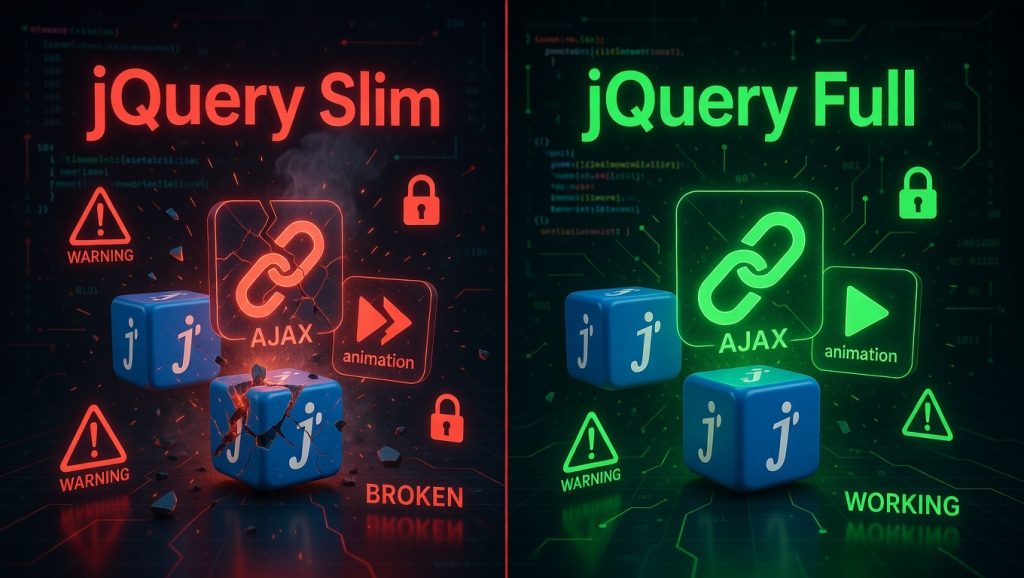
jQuery's two-build strategy reflects a deliberate architectural decision by the jQuery team to accommodate the diversity of use cases in the web development ecosystem. The library's functionality, organized into distinct modules, can be thought of as a spectrum from universally useful to specialized. DOM manipulation, event handling, selectors, and Deferred objects — the core utilities — are used in virtually every jQuery project. The AJAX and effects modules, while popular, are not universally required. By offering a Slim build that excludes these modules, jQuery allows projects that do not need them to reduce their JavaScript payload.
The jQuery source code is organized using a module system that makes this separation clean and explicit. Each functional area — core, selector, traversal, manipulation, events, ajax, effects, animation, deferred, and others — is defined as a separate module with clear dependencies. The build system allows modules to be selectively included or excluded from the final output, producing different bundles for different deployment contexts. The Slim build is the officially supported minimal bundle that excludes AJAX and effects while maintaining all core functionality.
What the Full Version Includes
The full jQuery library, in its compressed production form, weighs approximately 87 KB. This figure has remained relatively stable across jQuery 3.x versions, reflecting the maturity and stability of the library's feature set. The full library includes all jQuery functionality organized across its module system:
- Core utilities: the jQuery function itself, utilities like $.extend(), $.type(), and $.each()
- Selectors: the Sizzle CSS selector engine for complex DOM queries (or native querySelectorAll() in jQuery 3.x)
- DOM traversal: methods like find(), parent(), children(), siblings(), closest(), next(), and prev()
- DOM manipulation: methods like html(), text(), attr(), prop(), addClass(), removeClass(), css(), append(), prepend(), remove(), and clone()
- Event handling: methods like on(), off(), trigger(), click(), submit(), keypress(), and event delegation utilities
- Effects and animation: the complete effects module including animate(), fadeIn(), fadeOut(), fadeTo(), fadeToggle(), hide(), show(), toggle(), slideUp(), slideDown(), and slideToggle()
- AJAX: the complete AJAX module including $.ajax(), $.get(), $.post(), $.getJSON(), $.getScript(), and the load() method for loading remote content into DOM elements
- Deferred objects: jQuery's promise-like deferred system for managing asynchronous operations
- Data storage: the $.data() and $.removeData() methods for attaching arbitrary data to DOM elements
What the Slim Version Excludes
The jQuery Slim build, at approximately 70 KB compressed, saves 17 KB over the full build by excluding two complete modules: the Effects module and the AJAX module. This is not a minor feature reduction — these are substantial, functionally rich modules that are used extensively in the jQuery ecosystem. Understanding exactly what is missing from the Slim build is essential for making an informed choice between the two versions.
The Effects Module — What You Lose
The Effects module is responsible for all of jQuery's animation and transition functionality. Every method that changes an element's visibility or size with a transition belongs to this module. Absent from jQuery Slim:
- animate() — the core animation method that allows any CSS property to be animated between values over a specified duration with configurable easing
- fadeIn() — gradually increases an element's opacity from 0 to 1, making it visible
- fadeOut() — gradually decreases an element's opacity from 1 to 0, making it invisible
- fadeTo() — animates an element's opacity to a specified target value
- fadeToggle() — alternately calls fadeIn() and fadeOut() on successive calls
- hide() with duration — when called without arguments, hide() is available in Slim (it uses CSS display:none); when called with a duration argument (e.g., hide(400)), it uses the Effects module and is NOT available in Slim
- show() with duration — same distinction as hide(): argumentless show() works in Slim; show(400) does not
- toggle() with duration — same distinction: the animation variant is not available in Slim
- slideUp() — animates the element's height from its current value to zero, collapsing it vertically
- slideDown() — animates the element's height from zero to its natural height, expanding it vertically
- slideToggle() — alternately calls slideDown() and slideUp() on successive calls
| ⚠️ The hide() and show() Trap
One of the most confusing aspects of jQuery Slim's Effects module exclusion is the behavior of hide() and show(). When called WITHOUT a duration argument (e.g., $('#element').hide()), these methods work in jQuery Slim — they toggle the CSS display property directly. When called WITH a duration argument (e.g., $('#element').hide(400) or $('#element').hide('slow')), they use the Effects module and will fail silently in jQuery Slim, producing no animation and no error message. This is a particularly dangerous pitfall because the method exists and partially works — only the animated variant breaks. |
The AJAX Module — What You Lose
The AJAX module provides jQuery's toolkit for making asynchronous HTTP requests — loading data from servers without requiring a page refresh. Every AJAX-related jQuery method belongs to this module and is absent from the Slim build:
- $.ajax() — the core AJAX function providing full control over request type, URL, data, headers, success and error callbacks, and other request parameters
- $.get() — shorthand for making HTTP GET requests to a URL
- $.post() — shorthand for making HTTP POST requests to a URL with data
- $.getJSON() — shorthand for loading JSON data from a URL via GET request
- $.getScript() — loads and executes a JavaScript file from the server
- .load() — loads HTML content from a server and injects it directly into a matched DOM element
- AJAX event methods: ajaxStart(), ajaxStop(), ajaxComplete(), ajaxError(), ajaxSuccess(), ajaxSend()
- jQuery.ajaxSetup() — configures default settings for all subsequent AJAX requests
- jQuery.ajaxPrefilter() and jQuery.ajaxTransport() — advanced AJAX pipeline hooks
| Methods that fail silently when using jQuery Slim |
| // These ALL work in jQuery Full
// They ALL FAIL silently in jQuery Slim
// Basic AJAX request $.ajax({ url: '/api/data', method: 'GET', success: function(data) { /* ... */ } });
// GET shorthand $.get('/api/users', function(users) { /* render users */ });
// POST shorthand $.post('/api/save', { name: 'Alice' }, function(response) { /* ... */ });
// Load HTML into element $('#content').load('/partial.html');
// Animation (Effects module required) $('#banner').fadeIn(800); $('#modal').slideDown('slow'); $('#box').animate({ width: '300px', opacity: 0.5 }, 600); |
The Bootstrap Connection — A Critical Warning
Bootstrap 4: The Framework That Ships Slim
When Bootstrap 4 was released in January 2018, it introduced a dependency on jQuery for its JavaScript components — dropdown menus, modals, tooltips, popovers, collapsible elements, and other interactive UI components all required jQuery to function. This was not a new relationship; Bootstrap 3 had also depended on jQuery. What was new — and caught many developers off guard — was Bootstrap 4's choice to ship with the jQuery Slim version rather than the full library.
The decision made sense from Bootstrap's perspective: Bootstrap's own JavaScript components did not require jQuery's Effects or AJAX modules. Bootstrap's animations were implemented using CSS transitions rather than jQuery's JavaScript-based Effects module. Bootstrap's data loading was handled through its own mechanisms rather than jQuery AJAX. By specifying the Slim build in its getting-started documentation and CDN links, Bootstrap allowed its users to save 17 KB compared to the full jQuery library.
The problem arose when developers — following Bootstrap's getting-started documentation and copying the recommended CDN script tags into their projects — then added custom JavaScript functionality that relied on jQuery's excluded modules. A developer who adds a custom AJAX call to populate a table, or who adds fadeIn() to a notification, or who adds animate() to a custom UI element, will find that their code fails when jQuery Slim is loaded. Depending on the error handling in place, this failure may be silent — no error message, the method simply does not execute — making debugging particularly frustrating.
Bootstrap's CDN Configuration — What to Look For
Bootstrap's official documentation and CDN configurations have evolved, but the pattern of shipping Slim jQuery as the default has been consistent across Bootstrap 4.x and some Bootstrap 5.x configurations (though Bootstrap 5 removed its jQuery dependency for its own components, making the question moot for the framework itself — though developers often still load jQuery for their own use).
| Bootstrap 4 default CDN configuration — uses jQuery Slim |
| <!-- Bootstrap 4 Getting Started Documentation Example -->
<!-- This loads jQuery SLIM by default! --> <script src="https://code.jquery.com/jquery-3.5.1.slim.min.js" integrity="sha384-DfXdz2htPH0lsSSGFpoO8s..." crossorigin="anonymous"></script>
<!-- Bootstrap 4 Bundle (Popper.js included) --> <script src="https://cdn.jsdelivr.net/npm/bootstrap@4.6.0/dist/js/bootstrap.bundle.min.js" integrity="sha384-Piv4xVNRyMGpqkS2by6br4gNJ7DXjqk09RmUpJ8jgGtD7zP9yug3goQfGII0yAns" crossorigin="anonymous"></script>
<!-- ⚠️ WARNING: The above uses jQuery SLIM -- If you add custom AJAX or Effects methods, replace with full jQuery! --> |
| The fix: swap Slim for the full jQuery library |
| <!-- SOLUTION: Replace the slim CDN link with the full jQuery library -->
<!-- Use this instead of the Bootstrap-recommended Slim version -->
<!-- Full jQuery — includes ALL modules including AJAX and Effects --> <script src="https://code.jquery.com/jquery-3.7.1.min.js" integrity="sha256-/JqT3SQfawRcv/BIHPThkBvs0OEvtFFmqPF/lYI/Cxo=" crossorigin="anonymous"></script>
<!-- Then load Bootstrap as normal --> <script src="https://cdn.jsdelivr.net/npm/bootstrap@4.6.0/dist/js/bootstrap.bundle.min.js"></script>
<!-- Now $.ajax(), $.get(), animate(), fadeIn() etc. all work! --> |
Bootstrap 5 and jQuery: A Changed Relationship
Bootstrap 5, released in May 2021, made a significant architectural decision: it removed its dependency on jQuery entirely. Bootstrap 5's JavaScript components are written in vanilla JavaScript with no jQuery dependency. This means that for projects using Bootstrap 5 without custom jQuery code, jQuery is not required at all — neither the full version nor Slim.
However, many Bootstrap 5 projects still include jQuery because: the project uses a jQuery plugin that has not been migrated to vanilla JavaScript; the development team is more comfortable with jQuery syntax; the project is a migration from Bootstrap 4 where jQuery was already in use; or custom code written for the project uses jQuery features. In these cases, the jQuery version selection question remains relevant — and the same rules apply. If your custom code uses AJAX or Effects module methods, load the full jQuery. If your code uses only core jQuery features (selectors, DOM manipulation, events), the Slim version is sufficient.
| 💡 Bootstrap 5 Projects: Do You Even Need jQuery?
If you are starting a new project with Bootstrap 5 and are including jQuery out of habit or convention rather than necessity, pause and consider whether you actually need it. Bootstrap 5's own JavaScript components require no jQuery. Modern vanilla JavaScript (ES6+) provides querySelector(), fetch(), and CSS transition APIs that cover most jQuery use cases. Evaluating whether your project truly requires jQuery — and if so, which version — is a worthwhile exercise that may reduce your JavaScript payload by 70-87 KB. |
The Effects Module in Depth
Understanding jQuery Animation Architecture
To appreciate what the Effects module provides and why its exclusion from jQuery Slim has real consequences, it helps to understand how jQuery animations work under the hood. Unlike CSS transitions, which are handled by the browser's rendering engine with hardware acceleration, jQuery's JavaScript-based animations work by repeatedly calling a function at short intervals — typically using requestAnimationFrame in modern jQuery versions — and incrementally updating CSS property values to create the illusion of motion.
This architecture gives jQuery animations a level of flexibility and control that CSS transitions alone cannot match. jQuery can animate any numeric CSS property — width, height, opacity, left, top, margin, padding, font-size, line-height, and any other property with a numeric value. CSS transitions, by contrast, require explicit property declarations and cannot be easily triggered based on complex programmatic conditions. jQuery's animate() method can calculate start and end values dynamically at runtime and can chain multiple animations in sequence or in parallel.
The Effects Module Method Reference
| EFFECTS MODULE: COMPLETE METHOD REFERENCE | |
| animate(props, dur, ease, cb) | Core animation engine. Animates any CSS numeric property to a target value. Supports duration, easing function, and completion callback. |
| fadeIn(duration, easing, cb) | Animates opacity from 0 to 1. Reveals hidden element with smooth transparency transition. |
| fadeOut(duration, easing, cb) | Animates opacity from 1 to 0. Hides element with smooth transparency transition. |
| fadeTo(duration, opacity, cb) | Animates opacity to a specific target value between 0 and 1. |
| fadeToggle(dur, easing, cb) | Alternately fades element in and out on successive calls. |
| hide(duration, easing, cb) | WITH duration: animates width, height, and opacity to 0. WITHOUT duration: immediately sets display:none (works in Slim). |
| show(duration, easing, cb) | WITH duration: reverses the hide animation. WITHOUT duration: immediately restores display (works in Slim). |
| toggle(duration, easing, cb) | WITH duration: alternately hides and shows with animation. WITHOUT duration: immediate toggle (works in Slim). |
| slideUp(duration, easing, cb) | Animates element height to 0, effectively collapsing the element vertically. |
| slideDown(dur, easing, cb) | Animates element height from 0 to its natural height, expanding it vertically. |
| slideToggle(dur, easing, cb) | Alternately calls slideUp() and slideDown() on successive calls. |
| stop(clearQueue, jumpToEnd) | Stops currently running animation. Essential for managing animation queues. |
| delay(duration, queueName) | Adds a delay to the animation queue before the next queued animation runs. |
| queue() / dequeue() | Manages the animation queue — access and control the sequence of queued animations. |
| jQuery.fx.interval | Controls the animation frame rate. Default is 13ms (approximately 76fps). |
| jQuery.fx.off | Disables all animations globally when set to true — useful for testing. |
Real-World Effects Module Usage Patterns
The effects module is not just used directly by developers writing jQuery code — it is also a dependency for many jQuery plugins that implement UI behaviors using jQuery animation primitives. Accordion components, tab panels, dropdown menus, modal dialogs, and content carousels are all common UI patterns that have been implemented using jQuery's effects module. Third-party jQuery plugins that implement these patterns may require the effects module even if the developer building the site has not written any direct animate() or fadeIn() calls.
| Effects module patterns that fail with jQuery Slim |
| // Common animation patterns that all require the Effects module
// Notification banner that fades in, then out after 3 seconds function showNotification(message) { $('#notification').text(message).fadeIn(400).delay(3000).fadeOut(400); }
// Smooth scroll to section (uses animate) $('a[href^="#"]').on('click', function(e) { e.preventDefault(); var target = $(this).attr('href'); $('html, body').animate({ scrollTop: $(target).offset().top }, 600); });
// Accordion panel toggle with slide animation $('.accordion-header').on('click', function() { $(this).next('.accordion-body').slideToggle(300); $(this).toggleClass('active'); });
// Animated counter (uses animate with step callback) function animateCounter(element, target) { $({ count: 0 }).animate({ count: target }, { duration: 2000, step: function() { $(element).text(Math.ceil(this.count)); } }); } |
The AJAX Module in Depth
jQuery AJAX vs Fetch API
The AJAX module's exclusion from jQuery Slim is less universally impactful than the Effects module exclusion, because the modern web platform's Fetch API provides a capable native alternative for most AJAX use cases. However, for projects that are already using jQuery and that need to support environments where Fetch is not available or where jQuery AJAX's convenience API is preferred, the AJAX module remains relevant.
jQuery's $.ajax() function provides a unified interface for HTTP requests that was particularly valuable in the era before the Fetch API, when XMLHttpRequest was the only option and its API was significantly more verbose. jQuery's AJAX module also provides the .load() method for loading remote HTML fragments directly into DOM elements — a convenience with no direct Fetch equivalent — and utility methods like $.getJSON() that reduce boilerplate for common request patterns.
AJAX Module Method Reference
| AJAX MODULE: COMPLETE METHOD REFERENCE | |
| $.ajax(settings) | Core AJAX function. Full control over request method, URL, data, headers, content type, success/error callbacks, timeout, and all other request parameters. |
| $.get(url, data, cb) | Shorthand for $.ajax with type: 'GET'. Simplified interface for GET requests. |
| $.post(url, data, cb) | Shorthand for $.ajax with type: 'POST'. Simplified interface for POST requests. |
| $.getJSON(url, data, cb) | Shorthand for $.ajax with dataType: 'json'. Returns parsed JSON automatically. |
| $.getScript(url, cb) | Loads a JavaScript file from the server and executes it. Useful for lazy-loading. |
| .load(url, data, cb) | Loads HTML content from a URL and injects it into matched elements. Supports selector fragment for partial page loading. |
| $.ajaxSetup(settings) | Sets default values for all subsequent $.ajax() calls in the current page session. |
| $.ajaxPrefilter(types, fn) | Modifies or redirects AJAX requests before they are sent. Useful for authentication headers. |
| $.ajaxTransport(types, fn) | Creates a custom transport mechanism for AJAX requests. |
| .ajaxStart() / .ajaxStop() | Global event handlers triggered when AJAX activity starts or stops. |
| .ajaxComplete() / .ajaxError() | Handlers called when any AJAX request completes or errors. |
| $.param(obj) | Serializes an object or array into a URL-encoded query string. |
Modern Alternatives to jQuery AJAX
For developers building new projects or migrating from jQuery, the native Fetch API covers the most common AJAX use cases without any library dependency. Understanding the relationship between jQuery AJAX methods and their Fetch equivalents helps developers decide whether the AJAX module justifies loading the full jQuery build or whether they can use Fetch for their dynamic data needs while keeping jQuery Slim for other jQuery functionality.
| jQuery AJAX methods vs. native Fetch API equivalents |
| // jQuery AJAX (requires full jQuery — not available in Slim)
$.get('/api/users', function(data) { console.log(data); }); $.post('/api/save', { name: 'Alice' }, function(response) { /* ... */ }); $.ajax({ url: '/api/data', method: 'GET', dataType: 'json', success: function(d) { /* */ } });
// Native Fetch equivalents (work without jQuery at all) fetch('/api/users').then(r => r.json()).then(data => console.log(data)); fetch('/api/save', { method: 'POST', body: JSON.stringify({ name: 'Alice' }), headers: { 'Content-Type': 'application/json' } }).then(r => r.json()).then(response => { /* ... */ });
// The .load() method has no clean Fetch equivalent // jQuery: $("#container").load("/partial.html #section"); // Fetch equivalent requires manual DOM insertion: fetch('/partial.html') .then(r => r.text()) .then(html => { document.getElementById('container').innerHTML = html; }); |
Making the Right Choice — A Decision Framework
The Decision Matrix
The choice between jQuery Full and jQuery Slim should be made based on a clear-headed assessment of your project's actual jQuery usage — not out of habit, convention, or the path of least resistance. The following decision matrix covers the most common scenarios developers encounter and provides clear recommendations for each.
| Your Use Case | Use | Reason |
| Simple DOM manipulation only | Slim | No AJAX or effects needed — take the size saving |
| DOM + event handling only | Slim | Core jQuery is sufficient; no need for full build |
| Animations with animate() | Full | Effects module required — animate() not in Slim |
| fadeIn() / fadeOut() effects | Full | Effects module required — not available in Slim |
| hide() / show() animations | Full | Effects module required — avoid Slim |
| AJAX data loading | Full | AJAX module required — $.ajax(), $.get() etc. need full build |
| Bootstrap 4 + custom AJAX | Full | Bootstrap 4 loads Slim by default — override with Full |
| Bootstrap 4 + animations | Full | Bootstrap 4 loads Slim by default — override with Full |
| Bootstrap 4 + no custom jQuery | Slim | Default Bootstrap Slim is sufficient if no custom AJAX/effects |
| Pure vanilla JS project | None | jQuery may not be needed at all in modern projects |
Figure 2 — jQuery version decision matrix: use cases and recommendations
Auditing Your Project's jQuery Usage
For existing projects that are currently using jQuery, auditing the codebase to determine whether the Effects and AJAX modules are actually used is a straightforward process that can reveal opportunities to switch to the lighter Slim build — or conversely, to identify why switching would break functionality.
Begin by searching your JavaScript files and HTML templates for the method names that belong to the excluded modules. The methods to search for include: animate, fadeIn, fadeOut, fadeTo, fadeToggle, slideUp, slideDown, slideToggle, stop, delay, queue, dequeue (for the Effects module); and $.ajax, $.get, $.post, $.getJSON, $.getScript, .load, ajaxSetup, ajaxPrefilter (for the AJAX module). Any occurrence of these methods in your codebase means you require the full jQuery library.
Also consider indirect dependencies: jQuery plugins installed in your project may use these methods internally even if your own code does not. Before switching to Slim, verify that all jQuery plugins you depend on work correctly with the Slim build. Some plugins explicitly require the Effects or AJAX modules; their documentation should state their jQuery requirements.
| Bash search commands for auditing jQuery usage |
| // Quick audit: search your project for Effects and AJAX dependencies
// Run these searches in your project directory:
// Search for Effects module methods: // grep -r 'animate|fadeIn|fadeOut|fadeTo|fadeToggle' --include='*.js' . // grep -r 'slideUp|slideDown|slideToggle' --include='*.js' . // grep -r '.hide(|show(' --include='*.js' . (check for duration arguments)
// Search for AJAX module methods: // grep -r '$.ajax|$.get|$.post|$.getJSON' --include='*.js' . // grep -r '.load(' --include='*.js' .
// If any of these searches return results → use jQuery Full // If all searches return nothing → jQuery Slim is safe to use |
Performance Context: How Much Does 17 KB Actually Matter?
The 17 KB difference between jQuery Full (87 KB) and jQuery Slim (70 KB) is real but should be considered in context. On a modern broadband connection, 17 KB transfers in under 10 milliseconds. On a 4G mobile connection (typical throughput of 20 Mbps), 17 KB transfers in approximately 7 milliseconds. The practical performance impact of 17 KB on a well-configured web server with compression and caching is minimal for most users in most contexts.
Where the savings become more meaningful is in environments with constrained bandwidth or high latency — mobile users on slower 3G connections, users in regions with limited internet infrastructure, or users accessing sites on metered data connections. In these contexts, every byte counts, and the 17 KB saving from jQuery Slim represents a real improvement in loading experience.
The more significant performance optimization is typically not the choice between Full and Slim jQuery, but whether jQuery is needed at all — or whether it should be deferred (loaded with the async or defer attribute) so that it does not block the initial page render. A 17 KB saving achieved at the cost of breaking AJAX or animation functionality is not a performance optimization; it is a bug. Always prioritize correct functionality over file size optimization.
| 🚀 Better Performance Wins than Slim vs. Full
The 17 KB difference between jQuery builds is a small optimization. For much larger performance gains, consider: (1) Serve jQuery from a CDN — browser caching means returning visitors often have it cached already; (2) Use the defer or async attribute on your jQuery script tag to prevent render-blocking; (3) Minify and gzip your own JavaScript — gzip alone typically reduces JavaScript size by 60-70%; (4) Evaluate whether jQuery is needed at all — if you only use $() for 2-3 selectors, vanilla JavaScript querySelector() has no overhead. These measures individually offer more performance benefit than choosing Slim over Full. |
Debugging jQuery Slim Issues and Migration Guidance
Recognizing jQuery Slim Errors
When jQuery Slim is loaded and code attempts to call a method from the excluded Effects or AJAX modules, the behavior depends on the specific method. Some methods exist as stubs in the Slim build and simply do nothing — making debugging particularly difficult because no JavaScript error is thrown. Other method calls will produce a TypeError because the method is not defined on the jQuery prototype.
The most reliable way to verify whether a jQuery Slim issue is the cause of a problem is to temporarily swap the Slim CDN link for the full jQuery CDN link and test whether the broken functionality is restored. If swapping to full jQuery resolves the issue, you have confirmed that you are hitting a Slim module exclusion.
| Browser console diagnostics for jQuery Slim issues |
| // Diagnosing jQuery Slim issues in the browser console:
// Test 1: Check which jQuery build is loaded console.log(jQuery.fn.jquery); // Shows version string, e.g. '3.7.1' console.log(jQuery.fn.animate); // undefined → Slim loaded (Effects module missing) // [Function] → Full loaded (Effects module present) console.log(jQuery.ajax); // undefined → Slim loaded (AJAX module missing) // [Function] → Full loaded (AJAX module present)
// Test 2: Try calling the failing method with try/catch try { $('#element').fadeIn(400); } catch(e) { console.error('fadeIn failed:', e.message); console.log('Likely cause: jQuery Slim is loaded. Switch to jQuery Full.'); } |
Migration Guide — Slim to Full
Migrating from jQuery Slim to the full jQuery library requires only changing the script tag that loads jQuery. The full library is a strict superset of Slim — every method that works in Slim continues to work identically in Full. No code changes are required; only the CDN or local file reference needs to be updated.
| Migrating from jQuery Slim to jQuery Full — CDN replacement |
| <!-- BEFORE: jQuery Slim (what Bootstrap 4 recommends) -->
<script src="https://code.jquery.com/jquery-3.5.1.slim.min.js"></script>
<!-- AFTER: jQuery Full (what you need for AJAX and Effects) --> <script src="https://code.jquery.com/jquery-3.7.1.min.js"></script>
<!-- For local hosting, ensure you have downloaded the full build --> <!-- From: https://jquery.com/download/ → select 'Compressed, production jQuery 3.x.x' --> <!-- The file without '-slim' in the name is the full build --> <script src="/assets/js/jquery-3.7.1.min.js"></script> |
Conclusion: Make the Right Choice Before You Discover the Hard Way
The distinction between jQuery Full and jQuery Slim is one of those pieces of web development knowledge that seems minor until it causes a production bug. A developer who has carefully built a Bootstrap project, spent time designing animations and loading data via AJAX, and then deploys to production with the Bootstrap-default Slim jQuery loaded may face a puzzling situation: their code that worked perfectly in local development suddenly fails. The answer, when they find it, will be frustratingly simple: the wrong jQuery build.
The core rule is memorable because it is simple: if your JavaScript uses animate(), fadeIn(), fadeOut(), hide() or show() with a duration, slideUp(), slideDown(), slideToggle(), or any of jQuery's AJAX methods — $.ajax(), $.get(), $.post(), $.getJSON(), or .load() — you need jQuery Full. In all other cases, jQuery Slim is sufficient and the 17 KB saving, while modest, is real.
For Bootstrap developers in particular: check the script tags in your project's HTML template. If you see 'slim' in the jQuery filename, and if your project adds any custom JavaScript beyond what Bootstrap itself provides, review whether that custom JavaScript uses any Effects or AJAX methods. If it does, swap the Slim CDN link for the full jQuery link — it is a one-line change that prevents hours of debugging.
The broader lesson is about reading documentation carefully and understanding your tools at the level that allows you to make informed decisions. jQuery's distinction between Slim and Full builds is documented and explained on the jQuery download page. Bootstrap's choice to ship with Slim jQuery is visible in its getting-started documentation. The information is there — the skill is knowing what questions to ask before the wrong choice manifests as a production bug.
Frequently Asked Questions (FAQ)
1. What is the difference between jQuery Slim and Full?
jQuery Slim is a lightweight version of jQuery that excludes the AJAX and Effects (animation) modules. The Full version includes all features, making it suitable for projects that require animations or AJAX requests.
2. When should I use jQuery Slim?
Use jQuery Slim if your project only needs:
-
DOM manipulation
-
Event handling
-
Basic selectors
And does not use AJAX or animation methods like fadeIn() or $.ajax().
3. When should I use jQuery Full?
You should use jQuery Full if your project includes:
-
AJAX requests ($.ajax(), $.get(), $.post())
-
Animations (fadeIn(), slideDown(), animate())
-
jQuery plugins that depend on these features
4. Why do some functions not work with jQuery Slim?
Because jQuery Slim does not include certain modules. Functions related to AJAX and animations will either fail silently or not run at all.
5. Does Bootstrap use jQuery Slim or Full?
Bootstrap 4 uses jQuery Slim by default, which can cause issues if you add custom scripts that require AJAX or animations. Bootstrap 5 no longer requires jQuery.
6. How do I fix errors caused by jQuery Slim?
Simply replace the Slim version with the Full version:
<script src="jquery.slim.min.js"></script>
<!-- With this -->
<script src="jquery.min.js"></script>
7. Is jQuery still relevant today?
Yes, jQuery is still widely used, especially in legacy projects and platforms like WordPress. However, modern JavaScript (ES6+) can replace many of its features.
8. Can I use Fetch API instead of jQuery AJAX?
Yes. The Fetch API is a modern alternative to jQuery AJAX and works in most modern browsers.
9. Does jQuery Slim improve performance?
Yes, but only slightly (~17KB smaller). The performance gain is minimal compared to the risk of missing features.
10. How can I check if my project needs jQuery Full?
Search your code for:
-
$.ajax, $.get, $.post
-
fadeIn, fadeOut, animate, slideDown
If found → you need jQuery Full.
Tinggalkan Balasan