
How to Turn Your WordPress Website Into a Mobile App
3 minggu ago · Updated 3 minggu ago
Mobile is the dominant platform for internet access worldwide. In most markets, more than 60% of web traffic comes from mobile devices, and in many developing markets that figure exceeds 80%. Yet a significant proportion of WordPress websites are still primarily designed and optimised for desktop browser experiences - and while responsive design makes these sites usable on mobile, usability is not the same as an optimal user experience.
Mobile apps offer user experience advantages that mobile browser access to responsive websites cannot fully replicate: home screen presence (the app icon sits on the device, creating a persistent visual reminder of the brand), push notifications (the ability to reach users with timely messages even when they are not actively using the app), app store discoverability (users searching for products, services, or content in the App Store or Google Play can find the app), native-feeling interactions (smooth scrolling, gesture navigation, and platform-standard UI elements that feel different from browser-based web access), and offline functionality (in Progressive Web App implementations, some content can be available without internet connectivity).
For WordPress site owners, the traditional barrier to achieving these advantages was the cost and complexity of native app development. A native iOS app written in Swift and a native Android app written in Kotlin are entirely separate software projects, requiring specialized developer skills, significant time investment, and ongoing maintenance for platform updates. For a small business, blogger, e-commerce store, or nonprofit, this investment was prohibitively expensive.
WebView templates, WordPress app builder plugins, and Progressive Web App solutions eliminate this barrier. These tools convert a WordPress website's content and functionality into a mobile app experience without requiring any mobile development expertise. Changes made to the website are automatically reflected in the app. The cost is a one-time template purchase or a plugin subscription rather than an ongoing developer engagement. And the result can be published to the App Store and Google Play, giving the site the app store presence and home screen installation capability of a fully native app.
Franc Lucas, writing for Envato Tuts+, provides a comprehensive guide to the best available solutions. This expanded guide covers all three major categories of WordPress-to-mobile-app conversion: WebView templates (code templates that wrap a website in a native app shell), WordPress app builder plugins (tools that build native or near-native apps directly from the WordPress dashboard), and free Progressive Web App solutions (browser-based app experiences that don't require app store submission). It also covers the six best practices that determine whether a converted app performs well after launch.
Three Approaches Covered Quick Overview: WebView Templates (paid, CodeCanyon): Wrap your website in a native Android/iOS app shell - require one-time purchase + basic configuration - App Store + Google Play compatible -- WordPress App Builder Plugins (paid, CodeCanyon): Build native or Flutter-based apps directly from WordPress dashboard - deeper integration - WooCommerce compatible -- Free Solutions (PWA plugins): Convert WordPress to Progressive Web App - no app store required - browser-based installation -- All three: No coding required
Understanding Your Options: WebView, Native Builders, and PWAs
Before choosing a specific tool, understanding the three fundamental approaches to WordPress mobile app conversion helps match the right solution to your specific needs and goals.
WebView Templates: The App Shell Approach
A WebView template creates a native Android or iOS application that essentially contains a web browser window (the "WebView") displaying your website. From the user's perspective, they are using a native app - they install it from the App Store or Google Play, it appears on their home screen, and it can send push notifications. Under the hood, the app is loading your website's content inside a native app wrapper.
The major advantages of WebView templates are simplicity and synchronisation. Because the app is displaying your website's content, any changes you make to your WordPress site are automatically visible in the app without any additional steps. You don't need to maintain separate content for a website and an app. Updates to your website's design, content, and functionality are immediately reflected in the app.
The limitation of WebView apps is that they depend on internet connectivity (the app is loading web content) and the performance may be slightly less smooth than a fully native app that stores its content and logic locally. For most WordPress sites, this performance difference is not significant in practice, but for highly performance-sensitive applications it may be a consideration.
WordPress App Builder Plugins: The Native Approach
WordPress app builder plugins go a step further than WebView templates by building native or near-native Android and iOS apps that integrate with the WordPress API to load content. Rather than displaying a web browser view, these apps use native UI components to present WordPress content - posts, pages, products, and other content types - in a genuinely native interface.
The advantages of this approach include better performance, more native-feeling interactions, and deeper integration with device capabilities. The Flutter-based builders (like Cirilla) and React Native builders produce apps that use native rendering rather than web rendering, which can be noticeably smoother and more responsive.
The trade-off is that these builders are somewhat more complex to configure and may require more decisions about how content is displayed and organised in the app compared to WebView templates that simply inherit the website's existing design.
Progressive Web Apps: The Browser-Based Approach
Progressive Web Apps (PWAs) are websites that have been enhanced with specific browser capabilities that make them behave more like native apps. PWAs can be added to the home screen, can send push notifications (in browsers that support it), can cache content for offline access, and can run without browser UI elements (making them look like a native app).
The key advantage of PWAs is that they do not require app store submission. Users install them directly from the browser, bypassing the App Store and Google Play review process and their associated costs (Apple charges $99/year for App Store access; Google charges a one-time $25 developer registration fee). PWAs are also available to all web browsers, not just users who find and install a specific app.
The limitation is that PWA capabilities vary by browser and operating system. Safari on iOS supports fewer PWA features than Chrome on Android, which means the experience can be inconsistent across devices. And the lack of app store presence means PWAs don't benefit from app store search and discoverability.
Best WebView Templates (CodeCanyon): 7 Top Options
The following WebView templates are available on CodeCanyon and represent the best-selling and most actively maintained options for converting WordPress websites into mobile apps via the WebView approach.
Universal Android App (Best-Seller)
The Universal Android App template is one of the best-selling WebView templates on CodeCanyon. Its distinguishing feature is a dedicated "configurator" tool that allows developers and non-developers alike to define the app's content, layout, and functionality without writing any code. The template includes multiple dedicated layouts designed for different content types - blog content, news, portfolio, e-commerce, and others - meaning you can choose the layout that best matches your website's primary content type.
The feature set includes in-app purchase options (for monetisation within the app), AdMob advertising integration (for serving Google ads to generate revenue), push notifications powered by OneSignal, and comprehensive step-by-step documentation. The combination of a no-code configurator tool and deep feature coverage makes this one of the most accessible options for non-technical WordPress site owners.
WebViewGold for Android and iOS (Trending)
WebViewGold takes a broader approach than most WebView templates: rather than focusing exclusively on WordPress, it supports all kinds of web-based content including plain HTML, PHP, WordPress, Progressive Web Apps, and HTML5 games. This universality makes it useful for site owners who may have non-WordPress components to their web presence.
The template "wraps" web-based or local HTML content into a genuine native Android or iOS app - the phrasing "no more coding, no more plugins needed" reflects its no-code installation promise. WebViewGold supports AdMob banners and full-screen interstitial ads for monetisation. Its broad content compatibility and active maintenance have kept it trending on CodeCanyon since its initial release.
Web2App for Android and iOS (Trending)
Web2App is notable for its design customisation flexibility. Where many WebView templates offer limited visual customisation, Web2App provides seven different layout options allowing you to choose and customise themes to match your specific brand identity. This is particularly valuable for businesses where visual brand consistency between the website and the app is important.
The template includes comprehensive documentation, video tutorials, and step-by-step instructions. Franc Lucas notes that "its comprehensive documentation, along with video tutorials and step-by-step instructions, make your job much easier than you might have thought possible" - reflecting the accessibility of the setup process for non-developers. Web2App is available for both Android and iOS.
Universal Android WebView App (Best-Seller)
Universal Android WebView App is a native Android application that uses the WebView component to display website content. Its primary selling point is speed: "Create your own app in less than 15 minutes without any special knowledge." A single configuration file controls all settings, eliminating the need to navigate complex configuration interfaces.
The template includes Material Design styling (Google's design system for Android, which gives apps a native-feeling Android interface), geolocation support, and pull-to-refresh gesture support. It is compatible with WordPress and all major web frameworks and technologies including HTML5, CSS3, JavaScript, jQuery, Bootstrap, and others. The single-config-file approach makes it particularly efficient for simple conversions where customisation needs are limited.
RocketWeb for Android
RocketWeb distinguishes itself through its visual customisation depth. While most WebView templates offer a handful of colour schemes, RocketWeb provides over 50 colour schemes to choose from, allowing very precise brand colour matching between the website and the app. This breadth of colour options is particularly valuable for organisations with established brand guidelines.
Beyond visual customisation, RocketWeb supports RTL (right-to-left) text display for Arabic, Hebrew, and other RTL languages - a feature that makes it one of the few WebView templates suitable for websites primarily serving RTL language audiences. It also includes a dynamic sliding menu, push notifications, and AdMob advertising integration. No programming knowledge is required to configure any of these features.
SuperView WebView App for Android and iOS
SuperView is positioned as a solution for people who already have a website and want to quickly create a mobile app that displays their website's content. Its core features include AdMob integration, social login (allowing users to sign in with their Google or Facebook accounts), and in-app billing (for selling digital products or subscriptions within the app).
Additional features include Firebase push notifications, geolocation, a customisable splash screen, and a loading indicator. The combination of social login and in-app billing distinguishes SuperView from more basic WebView templates and makes it suitable for websites with user accounts or e-commerce functionality that needs to be accessible within the app.
Web To App: Android Web View
Web To App offers a drag-and-drop interface for configuring the app, making the conversion process particularly accessible for non-developers who prefer visual interfaces over text-based configuration files. Content can be loaded from local files or edited using the template's built-in HTML editor, giving some degree of content independence from the live website.
Navigation is a particular strength of this template: it supports four different navigation menu types, giving flexibility in how users move through the app. Monetisation features include AdMob banner ads and interstitial ads. The template also integrates with Ratebolt, which allows users to rate the app from within the app itself, which can drive App Store and Play Store ratings. A video tutorial is included for quick setup.

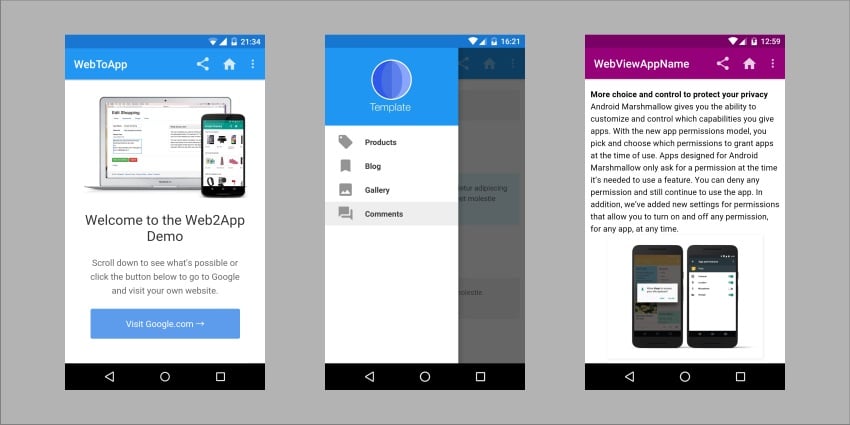
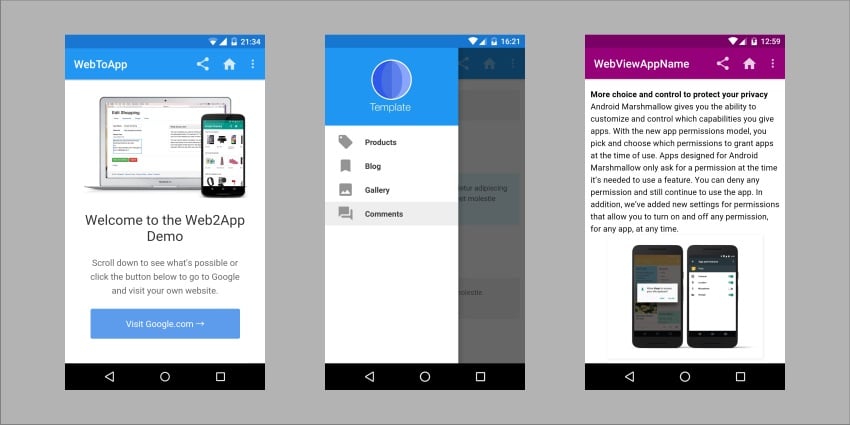
Figure 2: Side-by-side comparison showing a WordPress website (left) and its equivalent mobile app created using a WebView template (right). The app version includes native mobile UI elements including a navigation drawer menu, push notification capability, and home screen icon - all features that are not available in a standard mobile browser experience. The website content and any updates to it are automatically reflected in the app in real time. (Image credit: Envato Tuts+ / CodeCanyon)
Best WordPress App Builder Plugins (CodeCanyon): 5 Premium Options
WordPress app builder plugins take a different approach from WebView templates: rather than a code template that you configure and compile, these are WordPress plugins that build apps directly from the WordPress dashboard. They integrate with the WordPress API to create native or near-native apps with deeper WordPress integration.
WappPress: Android App Builder
WappPress is described as an excellent tool for converting any WordPress website into an Android app "instantly." Its defining characteristics are simplicity and real-time capability. The feature set includes push notifications, AdMob integration, a custom launcher icon (the icon that appears on the home screen), a custom splash screen (the image shown while the app loads), and instant app builds in real time.
The phrase "you can even replicate the functionality and features of your website in this app" reflects WappPress's ability to carry over WordPress-specific features - custom post types, specific plugins, functionality - rather than simply displaying web content in a WebView. For WordPress sites with significant custom functionality, this is an important distinction.
Android App Builder: Full Native App Plugin
Android App Builder is described as software that "creates native apps for Android without you having to write a single line of code" - positioning it as a tool for converting WordPress to a genuinely native app, not just a WebView-based app. Its capabilities extend to handling many of the technical details of Android app development automatically: writing new classes and activities, scaling icons, creating keystores, and other technical tasks.
The result is a ready-to-run project that can be tested on an emulator or a real device, and a signed APK or App Bundle ready to publish to the Google Play Store. The plugin runs locally on the developer's computer rather than uploading to a third-party server: "Everything starts and ends on your computer." This local processing approach means no sensitive credentials are shared with external services, which addresses a common security concern about cloud-based app builders.
The full workflow Android App Builder supports includes: generating the ready-to-run project, testing on emulator or physical device, generating the signed APK or App Bundle, and publishing to the Play Store. The plugin handles each step, and the description notes that "you won't even need to open Android Studio" - the standard Android development environment - reflecting the degree to which it automates the development process.
Cirilla: Multipurpose Flutter WordPress App Builder
Cirilla uses Flutter - Google's cross-platform UI framework that compiles to native code for both Android and iOS from a single codebase - to build WordPress apps. This cross-platform approach means a single configuration in Cirilla produces apps for both mobile platforms, reducing effort compared to maintaining separate Android and iOS builds.
The drag-and-drop interface provides unlimited customisable layout templates for designing apps that match brand guidelines. WooCommerce compatibility is a significant feature for e-commerce WordPress sites: Cirilla can turn a WooCommerce store into a native shopping app complete with product grids, carousels, product lists, customer reviews, and promotional banners. Multilingual support and multiple currency acceptance make it suitable for international e-commerce sites.
The Flutter compilation approach distinguishes Cirilla from WebView-based builders: the resulting app renders natively on both Android and iOS rather than displaying a web browser view, which typically produces better performance and a more polished user experience.
React Native WooCommerce and WordPress App Builder
This React Native-based builder specifically targets WooCommerce stores and businesses in specific verticals: food delivery, grocery ordering, pharmacy, and store delivery. React Native, like Flutter, compiles to native code, producing apps that perform well and feel native rather than web-based.
The converted app includes multiple screen layouts to choose from, multiple payment gateway integrations (critical for e-commerce apps), push notifications, social login, product display, and shopping cart functionality. The vertical focus means that common flows for these industries - browsing a menu, placing a delivery order, tracking a delivery - are built into the template, reducing the configuration needed for these specific use cases.
Flink: WordPress App Builder
Flink focuses on the content-first WordPress use case: blogs, publications, news sites, and content-heavy websites. It creates a native Android app that supports WordPress's full content model - posts, pages, categories, tags, in-post galleries, audio players, video players, and user accounts.
The WordPress API connection means that any content update on the website is "also updated in your app instantaneously" with no additional action required. This automatic synchronisation is particularly valuable for frequently updated content sites where maintaining separate app content would be impractical. Push notification support via Firebase allows content publishers to notify app users about new articles or updates. Multilingual support allows users to switch languages in app settings.
Free WordPress Mobile App Solutions
For WordPress site owners on tight budgets or those who want to explore mobile app conversion before committing to a paid solution, several free options are worth considering.
AppMySite: Free Android App Conversion
AppMySite offers a free starting tier that allows WordPress site owners to convert their site to an Android app at no cost. It also works for WooCommerce sites, supporting native shopping app creation. Apps created with AppMySite can be published on both the App Store and Google Play. The free tier has limitations: white-label branding (removing AppMySite's branding from the app) requires a paid subscription at $9 per month at the time of Franc Lucas's writing.
For small businesses and individuals who want to test the concept of having a mobile app before committing to a paid solution, AppMySite's free tier is a practical starting point. The full workflow - creating the app, testing it, and publishing it - is accessible through AppMySite's web interface without any technical skills.
SuperPWA: Super Progressive Web Apps
SuperPWA is an open-source WordPress plugin that converts a WordPress website into a Progressive Web App. The technical requirement is HTTPS - the website must be served over a secure connection, which is standard practice for modern WordPress sites using SSL certificates.
The user experience that SuperPWA enables is distinctive: users can add the website to their home screen from the browser, launching the "app" without opening a browser first, and the app runs without browser UI elements (address bar, navigation buttons) making it visually indistinguishable from a native app. Return visitors benefit from near-instant loading times due to PWA caching, and offline functionality means previously visited content is available without internet connectivity.
Progressive WordPress: PWA Plugin
Progressive WordPress is another PWA plugin with a specific focus on offline capability and home screen behaviour. Its offline functionality is described as working through pre-caching: "Progressive WordPress pre-caches all critical assets of your website, as well as all visited resources. So if there's no internet connection, it will serve the resources from the local storage."
The display behaviour control feature allows the site to run "without any browser elements, just like a native app" - addressing the visual difference between a PWA and a native app that browser chrome creates. For content-heavy WordPress sites where offline reading is a valuable feature, Progressive WordPress's aggressive caching approach is particularly relevant.
Appmaker WP: Free WordPress-to-App Conversion
Appmaker WP's conversion process is described as simple: install the plugin, upload the WordPress website's URL, give the app a name and icon, and the conversion is complete. This workflow is among the most streamlined of any solution covered in this guide, making it an accessible starting point for WordPress site owners who want to test mobile app conversion with minimal effort.
Like AppMySite, Appmaker WP supports both Android and iOS apps and is free at the entry level. The plugin architecture means the configuration happens within the familiar WordPress admin interface rather than on an external platform.
| Approach | Examples | Cost | App Store? | Coding? | Best For |
| WebView Template | Universal Android App, WebViewGold, Web2App | One-time ($20-$100) | Yes (Android + iOS) | No | Most WordPress sites; content sync important |
| App Builder Plugin | WappPress, Cirilla, Flink | One-time or subscription | Yes (Android + iOS) | No | Deep WP integration; WooCommerce stores |
| Progressive Web App | SuperPWA, Progressive WordPress | Free (open-source) | No (browser-based) | No | Budget-constrained; offline reading priority |
| Free App Builder | AppMySite, Appmaker WP | Free (with paid options) | Yes | No | Testing before committing to paid solution |
Table 1: Comparison of all four WordPress mobile app conversion approaches. WebView templates offer the best balance of features, app store presence, and low cost. App builder plugins are best for deeper WordPress integration and WooCommerce. Progressive Web Apps are free but lack app store presence. Free app builders are best for initial testing.
Six Best Practices for Mobile-Optimised WordPress Apps
Converting a WordPress website to a mobile app does not automatically produce an optimal mobile experience. The app's performance and usability depend on how well the underlying website is optimised for mobile. Following these six best practices ensures that the converted app performs well and provides the user experience that mobile users expect.
Funnel Mobile Devices to the Mobile Site
If your WordPress website has distinct mobile and desktop versions, use server-side redirects to ensure that mobile device users are consistently directed to the mobile version. When a WebView app loads a website URL, the redirect logic of the website determines which version of the site is served. Without proper server-side redirects, mobile users accessing the site through the app may receive the desktop version, which may not be optimised for the smaller screen and touch-based interaction.
Server-side redirect logic (rather than JavaScript-based redirects) is preferred because it executes before the page content is loaded and sent to the browser, ensuring the correct version is served from the start rather than redirecting after a desktop page has already begun loading.
Use a Mobile-First Design
A mobile-first design approach means designing the website with mobile screen sizes and touch interactions as the primary consideration, then scaling up to larger screens. For WordPress sites being converted to mobile apps, mobile-first design is particularly important because the app will primarily be used on small touchscreens.
Practical implications of mobile-first design include using larger touch targets (buttons and links that are large enough to tap accurately with a finger), leaving adequate spacing between interactive elements to prevent accidental taps, prioritising the most important content in the limited vertical space of a mobile screen, and ensuring that text is legible without zooming. The HTML5 DOCTYPE declaration and responsive design frameworks like Bootstrap or Foundation are standard technical foundations for mobile-first WordPress themes.
Use Viewport Metadata
The viewport meta tag in the HTML head of your WordPress pages instructs mobile browsers and WebView-based apps how to scale the page content for different screen sizes. Without proper viewport metadata, a mobile device may render the page at desktop width and then scale it down, resulting in very small text and elements that require zooming.
The standard viewport meta tag for responsive WordPress sites is: <meta name="viewport" content="width=device-width, initial-scale=1.0">. This tells the device to set the viewport width to the device's screen width and to use a 1:1 initial scale. Most modern WordPress themes include this automatically, but verifying its presence is a worthwhile step when converting a site to a mobile app.
Use a Vertical Layout
Mobile device interaction is primarily vertical: users scroll up and down, tap items in a vertical list, and navigate through vertical screens. Horizontal scrolling on mobile is generally considered poor UX - users are less accustomed to it and it is less comfortable on touch screens.
WordPress content and layouts should be organised vertically for mobile app conversion. This means avoiding wide horizontal layouts that require horizontal scrolling to see all content, using single-column layouts on small screens rather than multi-column grid layouts, and ensuring that navigation menus collapse into vertically-scrollable slide-out drawers or dropdown menus rather than horizontal navigation bars.
Avoid Content Wrapping Issues
Content wrapping problems occur when fixed-width elements (elements with a specific pixel width set in CSS) are wider than the mobile screen, causing them to overflow or forcing the browser to scroll horizontally. This is a common issue in WordPress sites originally designed for desktop screens that are being adapted for mobile.
The solution is to ensure that all elements use relative widths (percentages or viewport-relative units like vw) rather than fixed pixel widths for layout-critical elements. Setting the width to "100%" or "max-width: 100%" for images, tables, and embedded content ensures they scale within the parent container rather than overflowing. Avoiding fixed-width containers and instead using flexible layouts with CSS Flexbox or Grid prevents wrapping issues across different screen sizes.
Reduce Bandwidth Requirements
Mobile devices, particularly on cellular connections, have higher latency and lower bandwidth than typical desktop internet connections. A WordPress site optimised for desktop with large images, multiple external JavaScript files, and heavy CSS frameworks may load acceptably on desktop Wi-Fi but perform poorly on a mobile cellular connection, creating a poor in-app experience.
Bandwidth reduction strategies for WordPress sites being converted to apps include: image optimisation (compressing images to the minimum file size that maintains acceptable quality, using modern formats like WebP), lazy loading (only loading images when they scroll into view), minimising the number of external scripts and stylesheets, using a content delivery network (CDN) for faster asset delivery, and implementing WordPress caching to serve static pages rather than dynamically generating each page on every request.
Choosing the Right Solution for Your WordPress Site
With multiple approaches and many specific tools available, the decision of which solution to use depends on several factors specific to your WordPress site, budget, technical capability, and goals.
Key Questions to Guide Your Choice
Start by asking: What is the primary content type of my site? Blog and publication sites without e-commerce work well with WebView templates and content-focused builders like Flink. WooCommerce stores need solutions with specific e-commerce support like Cirilla or the React Native WooCommerce builder. General-purpose business sites work well with most WebView templates.
Second: What is my budget? If budget is tight, PWA plugins (free) or AppMySite/Appmaker WP (free with paid options) are the starting point. For sites with serious app goals, the one-time investment of a CodeCanyon WebView template ($20-$100) or app builder plugin is justified by the app store presence and feature depth.
Third: How important is App Store and Google Play presence? PWAs cannot be submitted to app stores (they are browser-based installations). WebView templates and app builder plugins produce APK/IPA files that can be submitted to the stores. If discoverability in app store search is a priority, only the paid options achieve this.
The Automatic Sync Advantage
One of the most compelling features of all three approaches - WebView templates, app builder plugins, and PWA solutions - is automatic synchronisation between the website and the app. Any content update, design change, or plugin addition to the WordPress website is reflected in the app without any separate app update process.
This synchronisation eliminates the primary ongoing maintenance concern for app owners: keeping app content current. Unlike a native app developed from scratch, which requires a new app release to the store for content updates, a WordPress-based app conversion always shows the current website content. For sites that update frequently - news sites, blogs, event-driven businesses - this is a critical operational advantage.
Conclusion: Reaching Mobile Users Without Writing a Line of Code
The mobile web is where a growing proportion of your audience lives. Converting your WordPress website into a mobile app is no longer a project that requires a development team, a significant budget, or months of work. WebView templates and WordPress app builder plugins have made the conversion accessible to any WordPress site owner, regardless of technical background.
The 7 WebView templates reviewed in this guide (Universal Android App, WebViewGold, Web2App, Universal Android WebView App, RocketWeb, SuperView, and Web To App) cover the full range of feature needs and budget levels, with most available as one-time purchases on CodeCanyon. The 5 app builder plugins (WappPress, Android App Builder, Cirilla, React Native WooCommerce Builder, and Flink) provide deeper WordPress integration and native app quality for more demanding use cases. And the 4 free solutions (AppMySite, SuperPWA, Progressive WordPress, and Appmaker WP) provide entry points for budget-constrained projects or initial testing.
The six best practices for mobile optimisation - server-side mobile redirects, mobile-first design, viewport metadata, vertical layouts, avoiding wrapping, and bandwidth reduction - are not optional additions after conversion. They determine whether the converted app provides the kind of mobile experience that keeps users engaged, or whether they abandon the app after a single use because it feels like a desktop site awkwardly squeezed onto a phone screen.
The opportunity is significant: millions of mobile users who might discover your content or business through an app store search or a friend's home screen recommendation are currently inaccessible to a WordPress site that exists only as a website. Converting your WordPress site to a mobile app with any of the solutions reviewed in this guide opens that channel without requiring the time, cost, or expertise of traditional app development.
"You have a chance to reach millions of mobile users by simply converting your WordPress website into a mobile app. WebView templates and mobile app builders on CodeCanyon will get you started right away!"
- Franc Lucas, Envato Tuts+
Complete Solution Summary All Tools Covered in This Guide: WEBVIEW TEMPLATES (CodeCanyon): 1. Universal Android App (configurator tool, AdMob, OneSignal) 2. WebViewGold Android + iOS (all web content types) 3. Web2App Android + iOS (7 layouts, video tutorials) 4. Universal Android WebView (15-min setup, single config file) 5. RocketWeb Android (50+ colour schemes, RTL support) 6. SuperView Android + iOS (social login, in-app billing) 7. Web To App (drag-and-drop, 4 nav menus, Ratebolt) -- APP BUILDER PLUGINS: 1. WappPress (instant builds) 2. Android App Builder (full native, local processing) 3. Cirilla Flutter (Android + iOS, WooCommerce) 4. React Native WooCommerce (food/grocery/delivery) 5. Flink (content sites, Firebase push) -- FREE: AppMySite, SuperPWA, Progressive WordPress, Appmaker WP
6 Mobile Best Practices Quick Reference: 1. Server-side redirects to mobile version -- 2. Mobile-first design (HTML5, touch targets) -- 3. Viewport meta tag (width=device-width, initial-scale=1.0) -- 4. Vertical layouts (no horizontal scroll) -- 5. Avoid wrapping (use % widths, max-width:100%) -- 6. Reduce bandwidth (compress images, CDN, caching, lazy loading)
FAQ – Converting WordPress Websites into Mobile Apps
1. Why should I convert my WordPress website into a mobile app?
Mobile apps provide better user engagement through push notifications, home screen presence, smoother interactions, and improved user experience compared to mobile browsers.
2. What are the main ways to convert a WordPress site into an app?
There are three main approaches:
- WebView templates – wrap your website inside a native app
- App builder plugins – create native or near-native apps from WordPress
- Progressive Web Apps (PWA) – browser-based apps with app-like features
3. Do I need coding skills to build a mobile app from WordPress?
No, all modern tools like WebView templates, app builder plugins, and PWA plugins are designed for non-developers and require no coding.
4. What is a WebView app?
A WebView app is a mobile application that displays your website inside a native app shell, allowing it to function like an app while syncing content automatically.
5. What are the advantages of app builder plugins?
They provide better performance, native UI experience, deeper integration with WordPress features, and support for e-commerce (like WooCommerce).
6. What is a Progressive Web App (PWA)?
A PWA is a website that behaves like a mobile app, allowing installation on the home screen, offline access, and fast loading without needing app store submission.
7. Can I publish my app on the App Store and Google Play?
Yes, WebView templates and app builder plugins allow publishing to both platforms, while PWAs do not require app store submission.
8. Which option is best for beginners?
WebView templates are the easiest and fastest option, especially for beginners who want a simple setup with automatic content syncing.
9. What are the limitations of WebView apps?
They rely on internet connectivity and may not be as fast or smooth as fully native apps in high-performance scenarios.
10. Are there free solutions available?
Yes, tools like PWA plugins and platforms like AppMySite offer free options, though advanced features may require paid plans.
11. How much does it cost to create a mobile app from WordPress?
Costs vary:
- WebView templates: $20–$100 (one-time)
- App builder plugins: one-time or subscription
- PWAs: often free
12. What are the key best practices for mobile optimization?
- Use mobile-first design
- Ensure proper viewport settings
- Avoid horizontal scrolling
- Optimize images and performance
- Use vertical layouts
- Reduce bandwidth usage
13. Will my app update automatically when I update my website?
Yes, most solutions sync content automatically, so any changes on your WordPress site appear instantly in the app.
14. Which solution is best for e-commerce websites?
App builder plugins like Flutter or React Native-based tools are best because they support WooCommerce features and payment systems.
15. Is a mobile app better than a responsive website?
A responsive website is usable, but a mobile app offers a more engaging and feature-rich experience, especially for returning users.
Tinggalkan Balasan