
Blog Designer Pro for WordPress Review 2026 – The Ultimate No-Code Blog & Website Design Tool
6 hari ago

Designing a beautiful, professional blog or website in WordPress has never been easier — or more powerful — than with Blog Designer Pro. Launched as a premium plugin, it has evolved significantly by 2026 into one of the most versatile no-code design tools available for WordPress users.
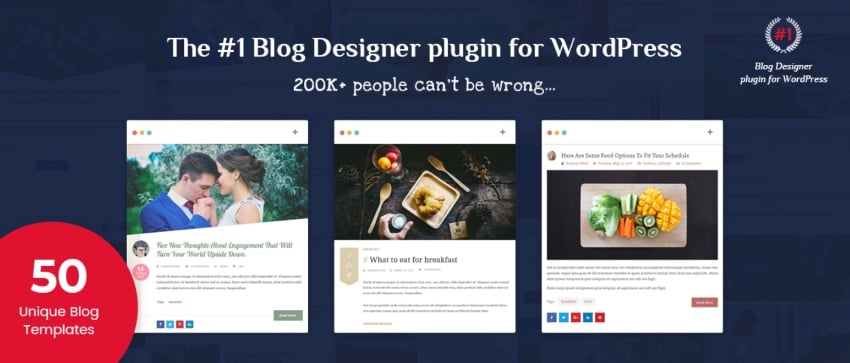
Whether you run a personal blog, a news site, a magazine-style publication, or even an online store, Blog Designer Pro eliminates the need for custom coding or hiring expensive designers. Instead, it gives you access to over 60 professionally designed blog templates, hundreds of customization options, and seamless integration with popular page builders and WooCommerce.
In this comprehensive 2026 review, we’ll dive deep into what makes Blog Designer Pro stand out, including its latest features, real-world performance, pros and cons, and how it compares to other popular WordPress design plugins. We’ll also cover practical use cases, pricing, and whether it’s the right choice for your next project.
If you’re tired of spending hours tweaking themes or dealing with clunky page builders, Blog Designer Pro promises to save you both time and money while delivering stunning results across all devices and browsers.
Let’s explore everything this plugin has to offer in 2026.
What Is Blog Designer Pro and Who Is It For?
Overview Blog Designer Pro is a premium WordPress plugin that transforms how you design and display blog posts, pages, categories, archives, and even WooCommerce products. Instead of relying on complex theme customizers or heavy page builders, it provides ready-made templates with deep customization options.
The plugin focuses on blog layouts but has expanded to support full website design, making it suitable for bloggers, content creators, news sites, magazines, and small business owners who want professional-looking sites without technical expertise.
Key Target Users
- Bloggers who want beautiful post layouts without coding
- Content creators managing large archives or multiple categories
- Online store owners needing attractive product displays (WooCommerce support)
- Agencies or freelancers building client sites quickly
- Anyone frustrated with limited theme options or slow page builders
Core Philosophy The plugin follows a “choose, customize, publish” workflow. You start with one of 60+ templates, tweak colors, fonts, layouts, and elements using an intuitive settings panel, and see live previews before going public. This approach dramatically reduces design time while maintaining high-quality results.
2026 Updates and Improvements By 2026, Blog Designer Pro has added enhanced AI-assisted layout suggestions, better mobile responsiveness, improved RTL (right-to-left) support, and deeper integration with modern block editors and popular page builders like Elementor, Beaver Builder, and Gutenberg.
Features Deep Dive – Templates, Customization, and More
Unique Blog Templates The plugin ships with over 60 blog templates, neatly categorized for easy selection:
- Grid Layouts
- Masonry Layouts
- Box View Layouts
- Timeline Layouts
- Story Layouts
- Full-Width Layouts
- Newspaper/Magazine Layouts
- Tabbed Layouts (great for sites with many categories)
One standout is the Tabbed Blog Template, which works exceptionally well for content-heavy sites, allowing users to switch between categories smoothly.
Extensive Customization Options Blog Designer Pro offers hundreds of settings to personalize every aspect:
- Layout adjustments (columns, spacing, borders)
- Color schemes and typography controls
- Background options (solid, gradient, image)
- Font selections with Google Fonts integration
- Custom CSS injection for advanced users
- Live Preview mode for instant feedback
You can customize main blog pages, category archives, single posts, author pages, and more. The settings panel is user-friendly, making it accessible even for beginners.
Widgets and Navigation Tools To improve user experience, the plugin includes:
- Scroll widgets
- Recent Posts widgets
- Most Viewed Posts widgets
- RTL-ready layouts for international audiences
These widgets help visitors navigate large sites more easily and keep them engaged longer.
Social Sharing Features Built-in social sharing buttons support major platforms (Facebook, Twitter/X, Pinterest, Instagram, LinkedIn, etc.). You can customize button styles, placement, and hover effects to match your brand.
WooCommerce Compatibility For online stores, Blog Designer Pro offers over 45 single-product layouts, including:
- Grid and Masonry views
- Slider and Carousel displays
- Magazine-style product showcases
- Vertical Timeline layouts
This makes it easy to create attractive shop pages without additional plugins.
Page Builder Support The plugin works seamlessly with leading page builders:
- Elementor
- Beaver Builder
- Gutenberg (Block Editor)
- WPBakery Page Builder
- Divi Builder
This flexibility allows users to combine Blog Designer Pro’s templates with their favorite builder for even more creative freedom.
Sample Articles and Multi-Language Support The plugin includes real sample articles as placeholders, helping users visualize layouts and get inspiration. Multi-language readiness makes it suitable for global audiences.
Real-World Performance and User Experience
Ease of Use Installation and setup are straightforward. After activating the plugin, you can immediately browse templates and apply one with a single click. The settings panel is well-organized, and Live Preview helps you see changes instantly without refreshing the page.
Performance Impact Blog Designer Pro is optimized for speed. Even with many customizations, sites load quickly when combined with good caching and optimization plugins. The templates are lightweight and responsive out of the box.
Mobile Responsiveness All templates adapt beautifully to phones and tablets. The mobile menu and touch-friendly elements ensure a great experience across devices.
Customization Depth While beginner-friendly, the plugin also offers enough advanced options (custom CSS, detailed typography controls, element spacing) to satisfy experienced designers.
Common Use Cases
- Personal blogs wanting a fresh, modern look
- News or magazine sites with heavy content
- Portfolio or author websites
- WooCommerce stores needing attractive product displays
- Multi-author blogs with category-specific layouts
Pros, Cons, and Comparison with Alternatives
Pros
- Huge selection of professional templates
- Deep customization without coding
- Excellent WooCommerce support
- Strong page builder compatibility
- Live Preview for instant feedback
- RTL and multi-language support
- Regular updates and good support
Cons
- Premium pricing (one-time or subscription depending on plan)
- Some advanced features require learning curve
- Limited free version or trial options in some regions
- May overlap with full page builders for very complex sites
Comparison with Popular Alternatives
- Elementor Pro: More powerful for full-site design but steeper learning curve and heavier on resources. Blog Designer Pro is more focused on blog-specific layouts.
- Divi Builder: Great flexibility but can feel bloated. Blog Designer Pro offers faster setup for blog-focused sites.
- Gutenberg Blocks: Free and built-in, but lacks the ready-made professional templates of Blog Designer Pro.
- Other Blog Plugins: Many offer fewer templates and less customization depth.
Who Should Buy It? Blog Designer Pro is ideal for users who want beautiful blog layouts quickly without deep coding knowledge. It’s especially valuable for bloggers, content creators, and small businesses that need professional results fast.
Pricing, Support, and Final Verdict
Pricing Blog Designer Pro is a premium plugin. Pricing typically includes one-time purchase options or annual subscriptions with updates and support. Check the official site for current deals, as bundles or lifetime options are often available.
Support and Documentation The plugin comes with detailed documentation and responsive support. Regular updates keep it compatible with the latest WordPress versions and security standards.
Final Verdict Blog Designer Pro remains one of the best investments for WordPress users who want to create stunning blogs and websites without hiring designers or learning complex code. Its combination of beautiful templates, deep customization, WooCommerce support, and ease of use makes it a standout plugin in 2026.
If you’re tired of generic themes or spending hours on design tweaks, Blog Designer Pro can save you significant time and deliver professional results that impress visitors and readers.
FAQ – Blog Designer Pro (2026)
1. What is Blog Designer Pro?
Blog Designer Pro is a premium WordPress plugin that allows users to create beautiful blog layouts without coding. It offers ready-made templates and advanced customization tools for blogs, news sites, and WooCommerce stores.
2. Do I need coding skills to use it?
No. Blog Designer Pro is a no-code plugin. You can design and customize blog layouts using an easy visual settings panel.
3. How many templates does it include?
The plugin includes 60+ professionally designed blog templates, including grid, masonry, timeline, magazine, and tabbed layouts.
4. Is Blog Designer Pro compatible with Elementor?
Yes. It works smoothly with popular page builders such as:
- Elementor
- Gutenberg (Block Editor)
- WPBakery
- Beaver Builder
- Divi Builder
5. Can I use it for WooCommerce stores?
Yes. Blog Designer Pro supports WooCommerce and includes product display layouts such as grids, sliders, and magazine-style designs.
6. Is it mobile responsive?
Yes. All templates are fully responsive and mobile-friendly, ensuring a smooth experience on smartphones, tablets, and desktops.
7. Does it support customization?
Yes. You can customize:
- Colors and typography
- Layout structure
- Spacing and backgrounds
- Category and post layouts
- Custom CSS (for advanced users)
8. Is Blog Designer Pro beginner-friendly?
Yes. It is designed for beginners, bloggers, and non-technical users, while still offering advanced options for developers.
9. Does it affect website speed?
The plugin is optimized for performance. When combined with proper caching and optimization tools, it has minimal impact on site speed.
10. Can I use it for news or magazine websites?
Yes. It is ideal for news sites, magazines, and content-heavy blogs due to its grid, masonry, and tabbed layouts.
11. Is there a free version available?
Some versions may offer limited features or demos, but the full feature set is available in the premium version.
12. Is it worth buying in 2026?
Yes, if you want:
- Fast blog design without coding
- Professional layouts
- Strong customization options
- WooCommerce compatibility
It is considered one of the best WordPress blog design plugins in 2026.
Tinggalkan Balasan