
Build a Simple Weather App With Vanilla JavaScript – Complete 2026 Tutorial (Updated with Modern APIs & Best Practices)
6 hari ago

Weather apps are among the most popular beginner-to-intermediate JavaScript projects because they combine several essential front-end skills: working with APIs, handling asynchronous data, manipulating the DOM, and creating responsive, user-friendly interfaces.
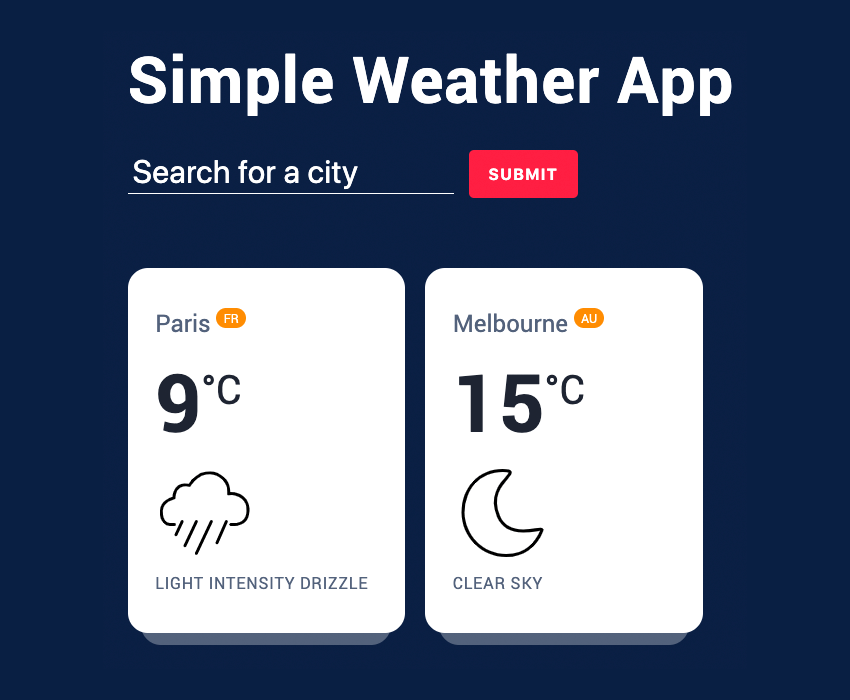
In this fully updated 2026 tutorial, we’ll build a clean, modern, and fully functional weather application using pure Vanilla JavaScript — no frameworks required. We’ll fetch real-time weather data, display it beautifully, handle errors gracefully, and make the app responsive across all devices.
What You’ll Build
- A sleek search interface for any city worldwide
- Current weather display with temperature, condition, humidity, wind speed, and more
- A list of previously searched cities (with duplicate prevention)
- Beautiful weather icons (custom SVG set + fallback)
- Light/dark mode toggle (optional bonus)
- Fully responsive design that works on mobile, tablet, and desktop
Why Build This in 2026? Modern weather apps need to be fast, reliable, and visually appealing. We’ll use up-to-date best practices:
- The Fetch API for clean asynchronous requests
- Modern CSS (Grid, Flexbox, CSS variables, and custom properties)
- Proper error handling and user feedback
- Accessibility considerations (ARIA labels, focus management)
- Performance optimizations for smooth user experience
APIs We’ll Use
- OpenWeatherMap (free tier with generous limits) — still one of the best free weather data providers
- Alternative: weatherstack API (bonus section) for comparison
Prerequisites Basic knowledge of HTML, CSS, and JavaScript (especially async/await and DOM manipulation). If you’re new to APIs, don’t worry — we’ll explain every step.
By the end of this tutorial, you’ll have a complete, production-ready weather app you can customize, deploy, or expand with features like forecasts, geolocation, or saved favorites.
Let’s start building!
Project Setup and HTML Structure
Folder Structure Create a simple project folder:
weather-app/
├── index.html
├── style.css
├── script.js
└── icons/          (for custom weather SVGs)
Basic HTML Skeleton
<!DOCTYPE html>
<html lang="en">
<head>
  <meta charset="UTF-8">
  <meta name="viewport" content="width=device-width, initial-scale=1.0">
  <title>Simple Weather App</title>
  <link rel="stylesheet" href="style.css">
</head>
<body>
  <header class="top-banner">
    <div class="container">
      <h1 class="heading">Weather Now</h1>
      <form id="search-form">
        <input type="text" id="city-input" placeholder="Search for a city..." autocomplete="off" required>
        <button type="submit">Search</button>
        <span class="msg" id="message"></span>
      </form>
    </div>
  </header>

  <main class="ajax-section">
    <div class="container">
      <ul class="cities" id="cities-list"></ul>
    </div>
  </main>

  <script src="script.js"></script>
</body>
</html>
Key HTML Elements
- Search form: Allows users to enter any city name (optionally with country code, e.g., "London,UK")
- Message span: Displays errors or helpful feedback
- Cities list: Dynamically populated with weather cards
Accessibility Notes
- Proper labels and ARIA attributes will be added in JavaScript for dynamic elements
- Semantic HTML structure improves screen reader support
Styling the Weather App with Modern CSS
CSS Variables for Easy Theming
:root {
  --bg-main: #0a1f44;
  --text-light: #ffffff;
  --text-med: #53627c;
  --text-dark: #1e2432;
  --accent-red: #ff1e42;
  --border-radius: 16px;
  --shadow: 0 10px 30px rgba(0, 0, 0, 0.15);
}
Global Styles & Reset
* {
  margin: 0;
  padding: 0;
  box-sizing: border-box;
}

body {
  font-family: 'Inter', system-ui, sans-serif;
  background: var(--bg-main);
  color: var(--text-light);
  line-height: 1.6;
  padding: 40px 20px;
  min-height: 100vh;
}
Header & Search Form
.top-banner {
  text-align: center;
  margin-bottom: 60px;
}

.heading {
  font-size: 3.5rem;
  font-weight: 700;
  margin-bottom: 30px;
  letter-spacing: -0.02em;
}

form {
  max-width: 480px;
  margin: 0 auto;
  position: relative;
}

input {
  width: 100%;
  padding: 18px 24px;
  font-size: 1.1rem;
  border-radius: var(--border-radius);
  border: none;
  background: rgba(255,255,255,0.15);
  color: white;
  backdrop-filter: blur(10px);
}

button {
  position: absolute;
  right: 8px;
  top: 50%;
  transform: translateY(-50%);
  padding: 12px 28px;
  background: var(--accent-red);
  color: white;
  font-weight: 600;
  border-radius: var(--border-radius);
  transition: all 0.3s;
}

button:hover {
  background: #c3112d;
}
Weather Cards Grid
.cities {
  display: grid;
  grid-template-columns: repeat(auto-fit, minmax(280px, 1fr));
  gap: 24px;
}

.city {
  background: rgba(255,255,255,0.95);
  color: var(--text-dark);
  border-radius: var(--border-radius);
  padding: 28px;
  box-shadow: var(--shadow);
  transition: transform 0.3s;
}

.city:hover {
  transform: translateY(-8px);
}

.city-name {
  font-size: 1.6rem;
  margin-bottom: 8px;
}

.city-temp {
  font-size: 4.5rem;
  font-weight: 700;
  line-height: 1;
  margin: 12px 0;
}

.city-icon {
  width: 80px;
  height: 80px;
}
Responsive Adjustments The grid automatically adapts from 1 column on mobile to 4 columns on large desktops.
Core JavaScript – Fetching and Displaying Weather Data
Getting Your API Key
- Go to OpenWeatherMap
- Sign up for a free account
- Copy your API key from the dashboard
Main Script Structure
const form = document.getElementById('search-form');
const input = document.getElementById('city-input');
const msg = document.getElementById('message');
const list = document.getElementById('cities-list');

const apiKey = 'YOUR_API_KEY_HERE';   // ← Replace with your key

form.addEventListener('submit', async (e) => {
  e.preventDefault();

  const inputVal = input.value.trim();
  if (!inputVal) return;

  const url = `https://api.openweathermap.org/data/2.5/weather?q=${inputVal}&appid=${apiKey}&units=metric`;

  try {
    const response = await fetch(url);
    const data = await response.json();

    if (response.ok) {
      renderCityCard(data);
      msg.textContent = '';
    } else {
      msg.textContent = data.message || 'City not found. Please try again.';
    }
  } catch (error) {
    msg.textContent = 'Network error. Please check your connection.';
  }

  form.reset();
  input.focus();
});
Rendering the Weather Card
function renderCityCard(data) {
  const { main, name, sys, weather } = data;
  const iconCode = weather[0].icon;
  const temp = Math.round(main.temp);

  const li = document.createElement('li');
  li.className = 'city';

  li.innerHTML = `
    <h2 class="city-name" data-name="${name},${sys.country}">
      ${name} <sup>${sys.country}</sup>
    </h2>
    <div class="city-temp">${temp}<sup>°C</sup></div>
    <figure>
      <img class="city-icon" src="https://openweathermap.org/img/wn/${iconCode}@2x.png" alt="${weather[0].description}">
      <figcaption>${weather[0].description}</figcaption>
    </figure>
  `;

  list.appendChild(li);
}
Preventing Duplicate Cities Add a check before creating a new card:
// Inside submit handler, before fetch
const existingCities = Array.from(list.querySelectorAll('.city'));
const isDuplicate = existingCities.some(city => {
  const cityName = city.querySelector('.city-name').dataset.name.toLowerCase();
  return cityName === inputVal.toLowerCase();
});

if (isDuplicate) {
  msg.textContent = `You already have weather for ${inputVal}.`;
  return;
}
Enhancing the App – Custom Icons, Error Handling, and Polish
Custom Weather Icons Replace default PNG icons with beautiful SVGs from Envato Elements or similar libraries for a more modern look.
Adding More Weather Details Enhance each card with humidity, wind speed, and feels-like temperature:
li.innerHTML = `
  <!-- existing content -->
  <div class="extra-info">
    <p>Humidity: ${main.humidity}%</p>
    <p>Wind: ${data.wind.speed} m/s</p>
  </div>
`;
Loading States and Better UX Show a loading indicator while fetching data and provide clear feedback for invalid cities.
Dark/Light Mode Toggle (Bonus) Implement a simple theme switcher using CSS variables and localStorage to remember user preference.
Deployment, Best Practices, and Next Steps
Making It Production-Ready
- Add proper error boundaries
- Implement rate limiting awareness
- Optimize for performance (debounce search if needed)
- Add geolocation support for "Current Location" button
Deploying the App Host it for free on platforms like Netlify, Vercel, or GitHub Pages.
Next Level Features to Add
- 5-day forecast using OpenWeatherMap’s forecast endpoint
- Save favorite cities with localStorage
- Unit toggle (°C / °F)
- Beautiful animations with CSS transitions
- PWA support for offline capability
Final Verdict This weather app demonstrates how powerful modern vanilla JavaScript can be. With just HTML, CSS, and the Fetch API, you can create a fully functional, good-looking application that fetches live data and presents it beautifully.
FAQ – Weather App (Vanilla JavaScript 2026)
1. What is this Weather App?
This is a simple real-time weather application built with Vanilla JavaScript that displays weather information such as temperature, humidity, and conditions based on a city name.
2. Which API is used?
The app uses the OpenWeatherMap API, one of the most popular free weather data providers for developers.
3. Do I need a framework like React or Vue?
No. This project is built using pure HTML, CSS, and JavaScript (Vanilla JS) without any frameworks.
4. How does the app fetch weather data?
It uses the Fetch API to send requests to OpenWeatherMap based on the user’s city input.
5. Is the weather data real-time?
Yes. All weather information is real-time data retrieved directly from the API.
6. What features does this app include?
- Search weather by city name
- Display temperature, humidity, and wind speed
- Automatic weather icons
- Duplicate city prevention
- Responsive design for all devices
7. Is the app mobile-friendly?
Yes. The layout uses CSS Grid and Flexbox, making it fully responsive on mobile, tablet, and desktop devices.
8. Can the app work offline?
No. Since it relies on an online weather API, an internet connection is required.
9. Can I add a 5-day weather forecast?
Yes. OpenWeatherMap provides a forecast endpoint that you can integrate to extend the app functionality.
10. How can I add dark mode?
You can implement dark mode using CSS variables combined with localStorage to save user preferences.
11. Is the API free?
Yes, OpenWeatherMap offers a free tier, but it has request limits per minute/hour.
12. Can I use this project for my portfolio?
Absolutely. This is a great project for a junior developer portfolio or GitHub showcase.
13. Why not use a framework?
The goal is to help beginners understand core concepts such as:
- Fetch API
- DOM manipulation
- Async/await
- Basic application state management
14. How can I improve performance?
You can improve performance by:
- Adding debounce to the search input
- Caching results in localStorage
- Reducing repeated API calls
- Adding loading indicators
Tinggalkan Balasan